



Why Google Maps Fails (And How to Stay Connected)
Even if you manage to bypass local network blocks, Google Maps suffers from the “China GPS shift problem.” China uses a proprietary coordinate system (GCJ-02), meaning Google’s street overlays are often hundreds of feet away from the actual satellite imagery. You might think you are standing outside your hotel, but the map shows you in the middle of a river.
What is the Great Firewall?
The Great Firewall is China’s complex system of internet censorship and regulation. It actively blocks access to foreign websites and apps, including Google, Meta, WhatsApp, and X. To access these platforms while inside China, travelers must use an approved VPN or an international roaming eSIM.
To use any local navigation tools, you need reliable data. Relying on public Wi-Fi is a rookie mistake, as most networks require a Chinese phone number to send an SMS verification code. Instead, install a travel eSIM before your flight takes off.
💡 Editor’s Pick: We recommend Nomad eSIM for China because it reliably bypasses the Great Firewall with stable speeds.
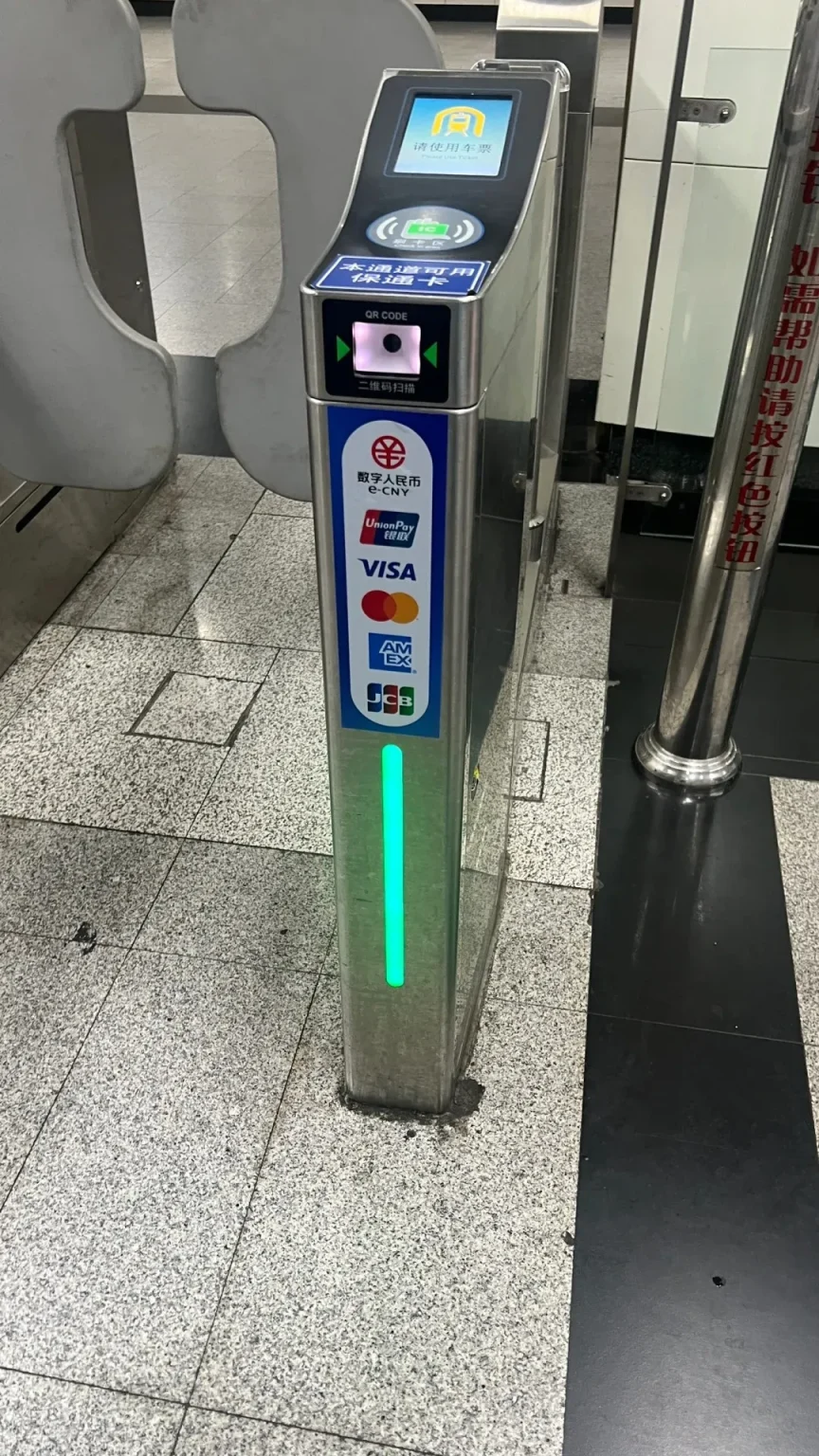
Navigating Beijing’s subway system is a breeze with these advanced turnstiles. While Google Maps may be out of reach, payment apps like Alipay and WeChat Pay, along with contactless options, make getting around seamless.
Apple Maps: The Easiest Choice for English Speakers
If you have an iPhone, you already carry one of the best travel tools for China. Apple Maps partners directly with Amap to source its local data, meaning the maps are highly accurate and legally compliant with China’s coordinate system. Better yet, it does not require a VPN to function.
Apple Maps automatically translates major street names, subway stations, and tourist landmarks into English. It gives excellent transit directions, telling you exactly which subway line to take and how many stops remain. However, it lacks the deep, granular integration of local Chinese apps—you cannot use it to order a taxi or scan a shared bike.
Amap (Gaode Maps): The Ultimate Local Tool
For the most authentic and precise navigation, download Amap (Gaode Maps). While it used to be entirely in Mandarin, the 2026 update introduced a robust 16-language interface, making it incredibly accessible for international tourists.
Amap is more than just a map; it is a super-app. You can use it to hail a DiDi (China’s version of Uber) directly from the route planning screen. It also integrates with shared mobility, allowing you to scan and unlock the blue Hello Bikes parked on nearly every street corner.
Insider Tip: Navigate by Subway Exits, Not Addresses
A common mistake foreigners make is trying to find a specific street address. Chinese cities are massive, and street numbers can be confusing. Instead, locals navigate by subway exits. When meeting a guide or finding a restaurant, ask for the nearest station and exit letter (e.g., “Jing’an Temple Station, Exit B”). Amap excels at mapping these exact underground exits.
Logistics: Mastering High-Speed Rail and Subways
Navigating between cities requires mastering China’s incredible high-speed rail network. Do not rely on third-party map apps for train schedules. Instead, book your tickets via Trip.com or the official railway app, 12306.
According to the official 12306 rail policy, foreign travelers no longer need paper tickets, but you cannot use the automated facial recognition gates. You must queue in the manual inspection lane (usually on the far left or right) so a staff member can scan your physical passport.
The sensory experience of a Chinese train station is unforgettable. It feels more like a massive airport terminal. Before boarding, skip the overpriced foreign coffee chains and grab a ¥2 bottle of Nongfu Spring water and some spiced tea eggs from a station convenience store.

In Shanghai, shared bikes are an ubiquitous and convenient way to get around. While Google Maps is unavailable, apps like Amap (Gaode Maps) and Apple Maps are essential tools for navigating the city, including finding and unlocking these bikes for your journey.
What to Know Before You Go: Visas and Payments
Before you even worry about navigation apps, ensure your entry logistics are sorted. China has aggressively expanded its visa-free travel policies in 2026, currently allowing citizens from 47 countries to enter visa-free for up to 30 days. If your passport isn’t on that list, you might still qualify for a transit visa.
What is the 144-hour visa-free transit?
The 144-hour visa-free transit is a policy allowing citizens of 54 eligible countries to stay in designated Chinese regions (like Beijing or Shanghai) for up to six days without a visa, provided they have confirmed onward flight tickets to a third country.
Once you clear customs, you need a way to pay. China is a virtually cashless society. Trying to hand a vendor a ¥100 bill for a street food pancake will often result in a confused stare. Download Alipay and WeChat Pay before your trip.
Both apps now allow foreigners to link international Visa and Mastercard credit cards. You will use these apps to pay for everything from your subway fare to your Amap-hailed DiDi rides. Set up your accounts and complete the identity verification process while you are still in your home country.
Is Baidu Maps Worth It?
Many older travel guides recommend Baidu Maps, but in 2026, it is largely unnecessary for non-Mandarin speakers. While Baidu has incredibly detailed street views and local business reviews, its English support lags significantly behind Amap. Unless you are fluent in reading Chinese characters, stick to Apple Maps or Amap to save yourself the headache.